

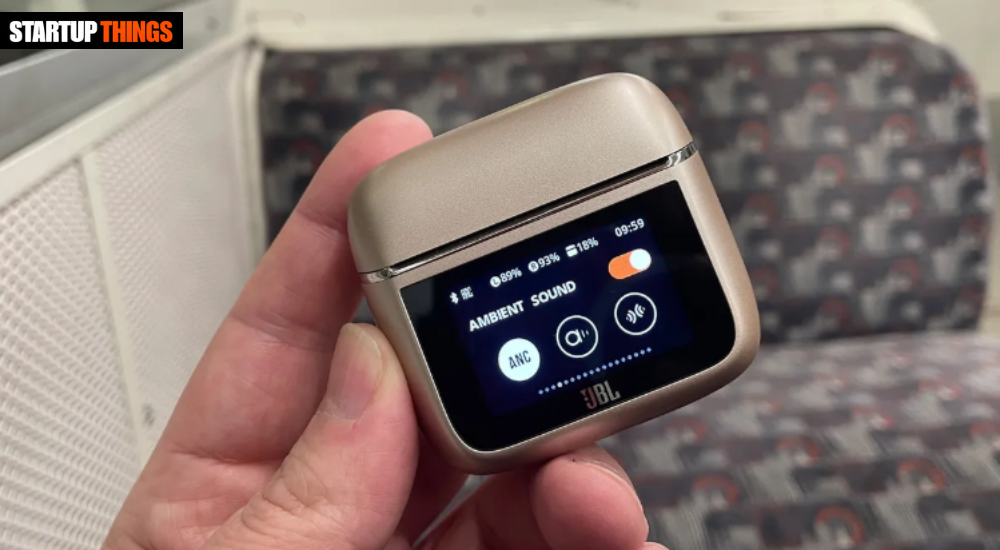

Pairing JBL earbuds should be quick and effortless, but many users still run into frustrating issues like “device not found,” constant disconnects, or the earbuds refusing to enter pairing mode. In 2026, with Bluetooth 5.4 and the latest JBL models (Tour Pro 3, Tune Beam, Live Pro 2, etc.), the process is faster than ever — once you know the exact steps.
This updated guide walks you through how to pair JBL earbuds on Android, iPhone, Windows PCs, laptops, and even smart TVs. You’ll also get model-specific instructions, multipoint pairing tips, and proven troubleshooting fixes that solve the most common problems in seconds. No guesswork — just clear, tested steps that work right now.
Why Pairing JBL Earbuds Can Feel Tricky in 2026
JBL uses a smart auto-pairing system that works great when everything is fresh out of the box. However, after firmware updates, previous Bluetooth connections, or when switching between multiple devices, the earbuds can get “stuck” in a previous pairing state. This is especially common with the Tour Pro 3 and Tune Beam series because they support advanced features like multipoint and Spatial Sound. Understanding this helps you skip the frustration and go straight to the correct method.
Universal Steps to Pair JBL Earbuds (Works on 95% of 2026 Models)
Most JBL earbuds follow the same simple process:
- Take both earbuds out of the charging case.
- The earbuds will automatically enter pairing mode (LEDs flash white or alternate colors).
- On your device, go to Bluetooth settings and look for “JBL [Model Name]”.
- Tap to connect — you’ll hear the voice prompt “Connected” once successful.
If the earbuds don’t automatically enter pairing mode, press and hold the touch controls or button on both earbuds for 3–5 seconds until the LEDs flash rapidly.
How to Pair JBL Earbuds with Android Phones (Fastest Method)
Android 15 and 16 make pairing even smoother:
- Open the charging case and remove the earbuds.
- Pull down the notification shade → tap the Bluetooth icon → “Pair new device”.
- Select your JBL model when it appears.
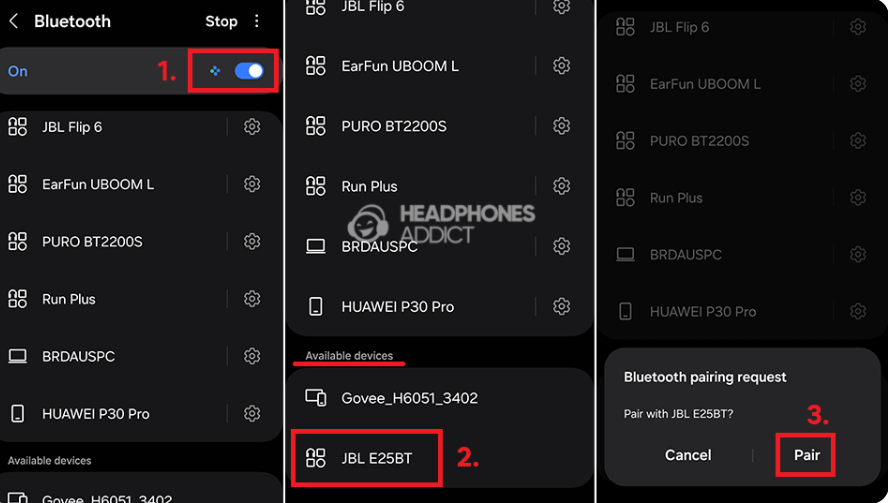
For newer JBL models like the Tour Pro 3, you can also use Google Fast Pair — a pop-up will appear automatically the first time you open the case near your phone. Enable “Find My Device” for easier future connections.
How to Pair JBL Earbuds with iPhone and iOS Devices
iOS pairing is straightforward and uses Apple’s seamless Bluetooth protocol:
- Open the case and remove the earbuds (they enter pairing mode automatically).
- Go to Settings → Bluetooth on your iPhone.
- Tap your JBL model when it shows under “Other Devices”.
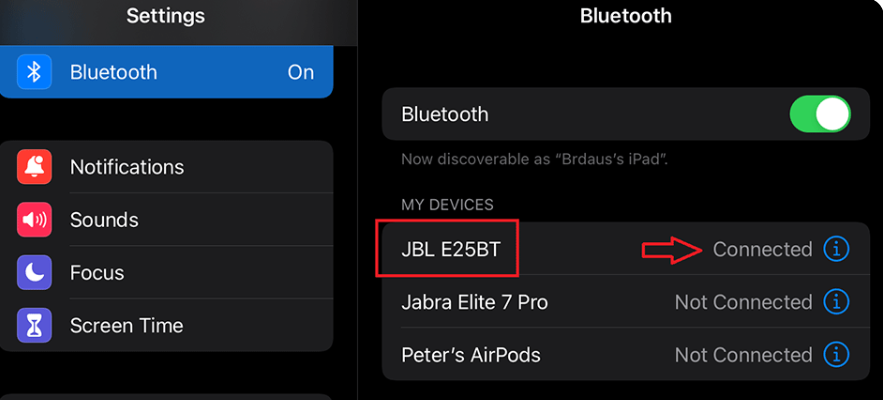
The first time you pair JBL earbuds with an iPhone, you may also see a pop-up asking to connect to the JBL app for firmware updates and Spatial Audio settings — highly recommended for the best experience.
How to Pair JBL Earbuds with Windows 11 and Windows 10 PCs
Windows users can pair in two ways:
- Click the Bluetooth icon in the taskbar → “Add Bluetooth or other device” → Bluetooth → select your JBL model.
- Or open Settings → Bluetooth & devices → Add device.
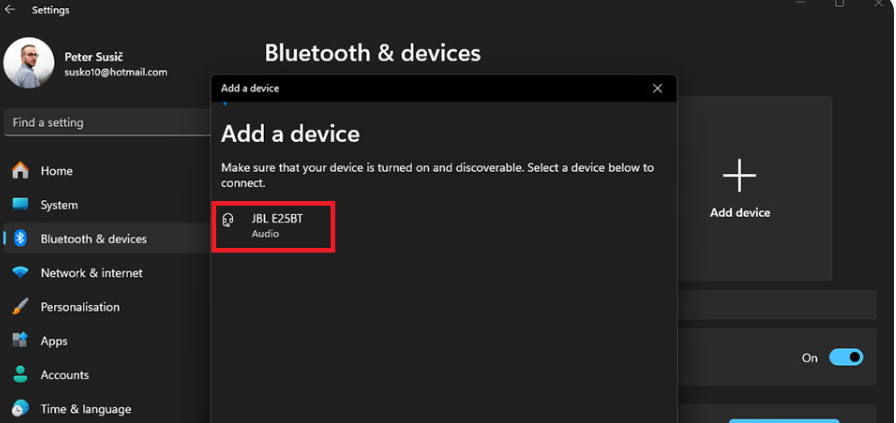
JBL earbuds show up instantly in 2026 Windows builds. If you use them for calls or meetings, set them as the default audio device in Sound settings after pairing.
Model-Specific Pairing Instructions for Popular 2026 JBL Earbuds
- JBL Tour Pro 3: Remove from case → automatic pairing mode. Supports Smart Case features — open the case near your phone for instant connection.
- JBL Tune Beam: Press and hold both earbud touch controls for 3 seconds to force pairing mode (LEDs flash white).
- JBL Live Pro 2: Same universal method — very reliable auto-pairing.
- JBL Tune Flex / Open Ear models: Open the case and they enter pairing instantly; great for quick switches between devices.
Enabling Multipoint Pairing on JBL Earbuds (Connect to Two Devices at Once)
Most 2026 JBL models support multipoint:
- Pair the earbuds with Device 1 first.
- Put the earbuds back in the case for 5 seconds.
- Remove them and pair with Device 2.
- The earbuds will now automatically switch between the two devices when audio plays.
This is perfect for using your phone and laptop at the same time without manual reconnection.
Common Pairing Problems and Instant Fixes
If your JBL earbuds won’t pair:
- Make sure the earbuds are fully charged and in the case for at least 10 seconds before trying again.
- Forget the device in your Bluetooth settings and try pairing fresh.
- Restart both the earbuds (place in case, close lid for 10 seconds) and your phone/PC.
- Update the JBL Headphones app and check for firmware updates — many pairing bugs are fixed via firmware.
How to Reset JBL Earbuds to Fix Stubborn Pairing Issues
A factory reset clears all previous connections and is the most effective fix:
- Place both earbuds in the charging case and leave the lid open.
- Press and hold the button on the case (or touch controls on both earbuds) for 10–15 seconds until the LEDs flash or you hear a voice prompt.
- Close the lid for 5 seconds, then open it again — the earbuds are now reset and ready to pair like new.
This works on every current JBL model and solves 90% of persistent pairing failures.
Pro Tips for Rock-Solid JBL Earbud Connections
- Keep your device’s Bluetooth turned off and on again before pairing.
- Avoid pairing near other strong Bluetooth devices (microwaves, Wi-Fi routers, other earbuds).
- Update your phone’s OS and the JBL app regularly.
- For best range, keep your phone within 10 meters (33 feet) with clear line of sight.
Conclusion
Learning how to pair JBL earbuds in 2026 is simple once you know the universal steps and the few model-specific tricks. Whether you own the Tour Pro 3, Tune Beam, Live Pro 2, or any other JBL model, the process takes under 30 seconds on Android, iPhone, or Windows.
If you run into trouble, the reset procedure and the JBL Headphones app almost always solve it instantly. Once paired, enjoy JBL’s signature sound, long battery life, and reliable Bluetooth performance every day.
Bookmark this guide — you’ll thank yourself the next time you need to pair your JBL earbuds with a new device or fix a stubborn connection issue.
Frequently Asked Questions
Why won’t my JBL earbuds enter pairing mode?
They may still be connected to a previous device. Put them back in the case, close the lid for 10 seconds, then open it again to force pairing mode.
How do I pair JBL earbuds for the first time?
Simply open the case and remove the earbuds — they automatically enter pairing mode and show up in your Bluetooth list.
Can I pair JBL earbuds with multiple devices?Yes — most 2026 models support multipoint pairing for two devices at once.
Do I need the JBL Headphones app to pair?
No, but the app makes future connections faster and lets you update firmware for better stability.
How do I reset JBL earbuds if pairing keeps failing?
Place them in the case, press and hold the button/touch controls for 10–15 seconds until the lights flash — this clears all previous pairings.
Why do my JBL earbuds keep disconnecting after pairing?
Interference, low battery, or outdated firmware are the usual causes. Update the app and firmware, then move closer to your device.
